Tools/Utilities Tabs Studio (for Visual Studio) - All Here

emailx45

Местный
Регистрация
5 Май 2008
Сообщения
3,571
Реакции
2,439
Credits
574
Tabs Studio (for Visual Studio)
more info Для просмотра ссылки Войди или Зарегистрируйся
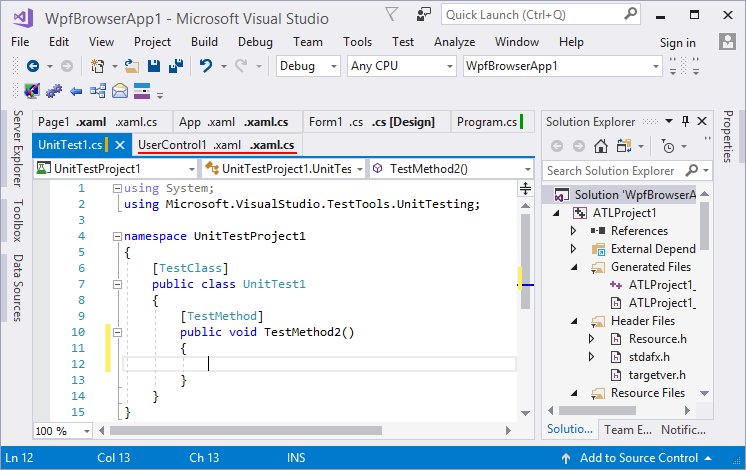
tabs-studio-extension-in-visual-studio-2017.png


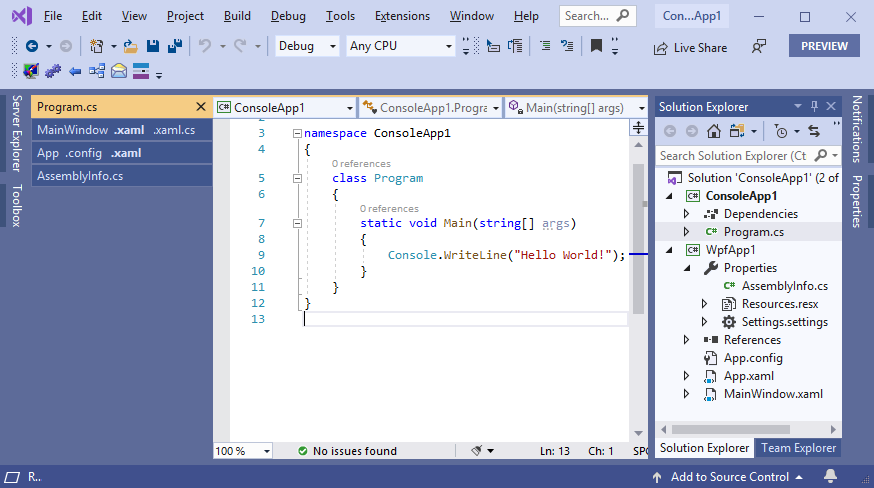
Tabs Studio is an add-on file for Visual Studio and sql server management that lets you organize and manage tabs and documents during programming.
  • The Tabs Studio software allows the tabs of the documents to be intelligently entered into a group and by creating multiple rows, all tabs are visible.
  • When you work on projects with 20 or 30 tabs simultaneously, finding documents is a tedious task.
  • This software allows you to go to another tab with a click of a mouse or several keyboard shortcut keys.
  • Instead of showing tabs in multiple rows, you can put them vertically in a separate toolbar window.
Features of Tabs Studio:
  • Tabbed Rows - View all tabs in multiple rows or limit the maximum number of rows
  • Tab Grouping - Automatically collating tabs with different names and extensions in a long tab
  • Tab coloring - Set different colors for tabs in accordance with a specific tab, project or path pattern
  • Keyboard selection - Open, close, and change tabs using keyboard shortcuts (customizable).
  • Flexible behavior - Settings for sorting and grouping tabs
  • Extensibility API - Writing personal extensions for Studio tab and Visual Studio in .NET
Screenshots: Для просмотра ссылки Войди или Зарегистрируйся

Required system
  • Visual Studio
[SHOWTOGROUPS=4,19,20]
Installation guide: Read the Readme.txt file in the Crack folder.
Generic Patcher: Для просмотра ссылки Войди или Зарегистрируйся

Для просмотра ссылки Войди или ЗарегистрируйсяДля просмотра ссылки Войди или ЗарегистрируйсяДля просмотра ссылки Войди или ЗарегистрируйсяДля просмотра ссылки Войди или ЗарегистрируйсяДля просмотра ссылки Войди или Зарегистрируйся[/SHOWTOGROUPS]
 

GuDron

dumpz.ws
Admin
Регистрация
28 Янв 2020
Сообщения
10,783
Реакции
1,639
Credits
40,874
Tabs Studio
121212.png
Версия: 5.7.0
Год выпуска: 2025
Разработчик: Vlasov Studio
Лечение на борту
Требования: Visual Studio
Comfortably work with any number and type of documents in Visual Studio and SQL Server Management Studio
You love to write code, not scan the document well for a file name you need to switch to, and then scan the file menu drop-down list, and then resort to Solution Explorer or search. Only to repeat it a minute later when you need to switch to another document! And when you open two files with the same name there is now a game to guess the right tab from the two identically looking ones. Or maybe you recently edited a file and now don't remember its exact name — no help for you to reopen recently saved files, all tabs look the same now. Switching just between two open documents back and forth is not possible with a single keyboard shortcut and no additional windows!
You switch documents in Visual Studio hundreds of times a day and naturally want it to be a non-event, not a little quest breaking your flow again and again. The Tabs Studio extension completely replaces Visual Studio tabs and gives you precise control how to view open documents and navigate between them.
pic

Two rows of tabs
Tabs Studio automatically groups together in an extended tab corresponding C++ source and header files, WPF markup and code-behind, ASP UI and code-behind, form code and designer, WCF service and code, and other open documents that differ only in the extension. It saves screen space, lets you quickly switch between corresponding files and conveniently organizes tabs:
pic

Tab groups
It is possible to create custom corresponding file grouping rules. For example, if you use doc, ctl, and vm file name prefixes for documents, controls and view models, the following files docOrders.xaml, docOrders.xaml.vb, vmOrders.vb, ctlToolbar.xaml, ctlToolbar.xaml.vb and vmToolbar.vb can be grouped like this:
pic

You can quickly open corresponding files from a tab context menu, with a keyboard shortcut, and set them to open automatically when you open one of the files.
Multiple sorting and grouping rules can automatically sort tabs by name, path, and group them by project, extension and other criteria. Super groups of tabs can be visually separated with a margin or even placed on separate rows, for example, each row for each project:
pic

Project rows
If you prefer the vertical tabs layout, you can select it in Visual Studio or Tabs Studio options:
pic

Vertical tabs
Tab coloring rules automatically set tab background and foreground colors based on an extension, project and other document properties:
pic

Colors
You can manually highlight tabs with several predefined colors:
pic

Highlighting
Modified documents are marked with a yellow bar and saved documents are marked with a green bar. It allows you quickly spot recently edited documents as they are usually more important for your current task and less numerous than documents opened just for reading code:
pic

Tracked status
Tabs Studio can automatically add a folder or a project name to document titles for disambiguation, when it detects two or more tabs with the same name:
pic

Disambiguator
Keyboard shortcuts are available to switch to a next/previous tab or extension, to reorder tabs and to directly navigate to the first 20 tabs. If you do use direct navigation, you can turn on tab numbers:
pic

Tab numbers
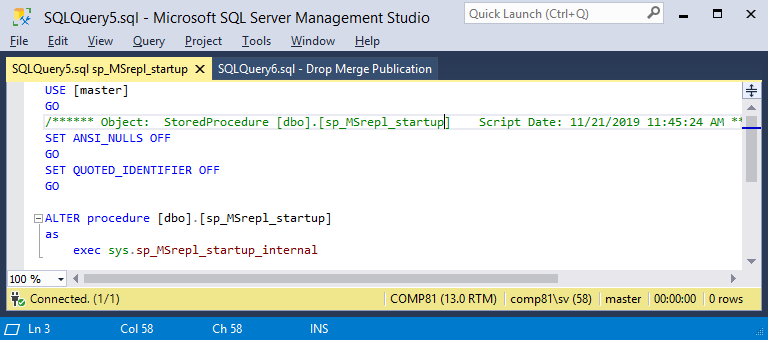
Especially useful for SQL Server Management Studio, where tabs are usually named SQLQuery1.sql and SQLQuery2.sql, is the ability to manually add a custom comment to a tab title or automatically assign it based on the document contents:
pic

SQL comment
1. Запустите TabsStudio_570.msi.
2. Установите.
3. Запустите PatchTabsStudio.ps1.
4. Запустите Visual Studio. Найдите тулбар Tabs Studio, нажмите кнопку About, там введите любое имя и ключ и нажмите OK. Программа должна быть активирована.
Скрытое содержимое могут видеть только пользователи групп(ы): Premium, Местный, Свои
dumpz.ws